 Breathedge 2 Wiki
How to Repair Tools in Breathedge 2
You cannot repair your tools, and in practice you do not need to. Tools do have a Durability stat in their inspect panel, but every reading of it we have found sits at 100/100, and nothing in two dedicated crafting guides or a two-and-a-half-hour recorded playthrough shows a tool taking damage. There is no repair action for a tool either way.
If a tool has stopped working, something else is wrong. This page covers all three reasons people end up searching for this.
Correcting an easy assumption
Tools are not damage-free by design in the way the first draft of this page claimed — the inspect panel for a drilling tool (see the screenshot below) shows two separate bars, Charge and Durability, both out of 100. So the mechanic exists in the UI. Nothing in the sources below shows Durability reading below 100.
- VGTimes and Destructoid, both devoted entirely to tools — unlocking, crafting and upgrading them — contain nothing about tool durability, damage or repair.
- A full playthrough of the Early Access build never shows the figure drop.
- What the same sources do describe wearing out is upgrade modules, which is covered below, and which is a different stat from the tool's own Durability.
Wording it precisely: in Early Access 0.8, tools carry a Durability stat, and nothing yet shows it below 100. Whether it can drop under conditions nobody has recorded, or whether it is vestigial, is unconfirmed.
What actually wears out: upgrade modules
At the workbench in your base you fit modules to your tools, and those have limited durability and need replacing periodically. You find replacements inside panels and crates.
The distinction matters because it is what players notice: your tool suddenly feels weaker, so you assume it is damaged. It is not — the module on it is spent, and you swap in a new one rather than repairing anything.
| Tool | Module | Effect |
|---|---|---|
| Scrap | Gear | +10 damage |
| Scrap | Barbell Plate | +20 damage |
| Cutter | Scissors for the Cutter | +5 damage |
| Thumper | Scissors for the Thumper | +12 damage |
The Barbell Plate is the upgrade you feel most: one recorded run went from roughly twenty hits to break an object down to four. Other cosmetic and functional attachments show up in play too — a bone as a handle for the Scrap tool, chompers on the Cutter for faster harvesting, and gears that also fit the food and water processors.
"My tool is not doing anything"
Nine times out of ten this is not damage. Check, in order:
- Battery charge. The Thumper runs on power and needs recharging when it runs out. Charging posts at the shuttle station do it for free.
- The Flashlight. It runs for about a minute before it needs to recharge. That is by design.
- The Spraytron. With no substance loaded it simply does nothing.
- Carry weight. A full pack blocks collection, which reads as the tool failing to harvest.
- Your flight propellant. It refills automatically inside the ship, and later you can craft a Gas Generator to refill it in the field.
That list resolves most "stuck" reports. It is the same advice the walkthrough gives for objectives that appear impossible.
You are probably thinking of Breathedge 1
The first game had an item literally called the Repair Tool. Breathedge 2 does not. The sequel's tool set is Scrap (some guides call it the Crowbar), Cutter, Thumper, Twister, Spraytron and Flashlight, plus the Medkit, Gas Tank and Backpack as equipment.
Do not craft from a Breathedge 1 Repair Tool recipe. The item does not exist here, and following a first-game guide will send you gathering materials for nothing.
What "repair" does mean in Breathedge 2
Repairing is a real and constant activity — it just applies to machines in the world, not to your gear. You spend materials to fix:
- Service warmers, to raise the ambient temperature
- The Foreman robot, with Metal ×4 and Electronics ×3
- Antennas, terminals and control panels
- The ticket booth and its console
- The loudspeaker
- The shuttle's hull breach, with Metal ×4, Titanium ×4, Duct Tape ×1 and Rubber ×4
- Small Engines, each marked by a blinking red light, which unlock blueprints
The official Early Access description lists repair among the game's systems for exactly this reason. It means fixing the world, not your inventory.
Suit and helmet upgrades — the adjacent question
If your gear feels weak, this is usually the actual answer. The default helmet and suit offer no protection at all against cold, heat, radiation, shocks or physical damage. You gain protection by attaching materials:
| Material | Effect |
|---|---|
| Cardboard | Cold +75, shock +60, armour +45 |
| Foam | Cold +90, hunger drain +10, heat -2 |
| Knitted Teddy Bear | Cold +102, radiation +54, armour -1 |
Cold protection is the hard gate in Chapter 1 — the story asks you to
Raise Cold Protection to 100 — so this table is the fastest route past that wall.
The full tool list
For reference, this is everything you carry in the Early Access build, so you can see there is no repair item among them:
| Tool | Made from | What it is for |
|---|---|---|
| Scrap (also called the Crowbar) | Metal ×2 | Breaking debris, ice, barrels; the story's sensor also gets hit with it |
| Cutter | Aluminium ×4, Plastic ×2, Metal ×4 | Rubber mats, fabric, cardboard, foam, wiring boxes, membranes |
| Thumper | Metal ×4, Plastic ×2 | Drilling asteroid veins for aluminium and titanium |
| Twister | Aluminium ×4, Wires ×2, Duct Tape ×3, Plastic ×2 | Unscrewing light bulbs, pulling Techbits, roof radiators |
| Spraytron | Titanium ×4, Refined Metal ×4, Battery ×2, Glass ×2 | Dissolving parasitic growth, collecting alkaline substance |
| Flashlight | Plastic ×2, Wires ×2, Glass ×2, Light Bulb ×1 | Light, about a minute per charge |
| Medkit, Purified Oxygen, Alcohol | Various | Consumables |
| Gas Tank, Backpack | See rubber and titanium | Capacity upgrades |
None of these has a repair recipe or a workbench repair action. Drilling tools do carry a Durability readout (see below) — it is just not something anyone has documented moving. The titanium and rubber pages cover the material costs above.
What the inspect panel actually shows
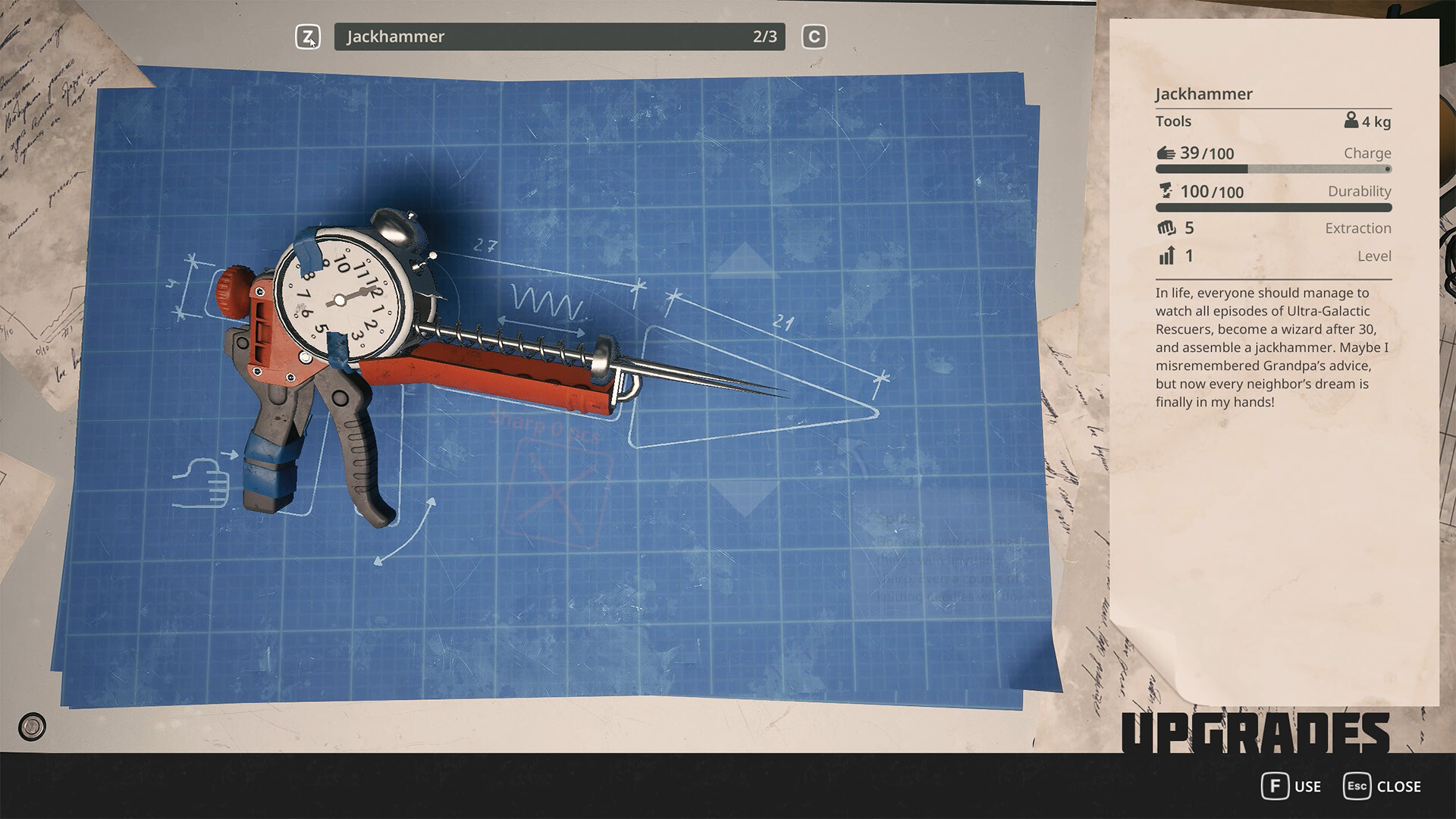
Official Steam screenshot. The panel reads Charge 39/100 and Durability 100/100 as two separate stats, plus Extraction and Level.
This is a drilling tool with the stats Charge 39/100, Durability 100/100, Extraction 5, Level 1 — the extraction stat and the asteroid-drilling flavour text match the tool community guides call the Thumper, though the in-game panel itself labels it Jackhammer — a name the guides do not use. The guides and players call it the Thumper, so that is the name we use throughout.
Two things this image settles: Charge and Durability are tracked separately — running out of Charge is not the same problem as low Durability — and a durability system exists in the UI even though nothing yet shows it decreasing. If your tool feels weak, check Charge first; it is the stat that actually moves.
If durability ever starts moving
Early Access changes things, and the stat is already sitting there in the UI waiting to be used. If Durability starts dropping in a future patch, the signal will be a repair prompt appearing at the workbench, or a line in the patch notes. Until then, gathering materials to fix a number that has never moved is wasted effort.
More in Crafting
Titanium
Two ways to get it, and what it is used for.
Read guide →Rubber
It is on the platform surface — bring the Cutter.
Read guide →Lightbulb
Inside the traffic light in the yellow tunnel.
Read guide →